The calendar on the product page only offers days covered by a price list row. Without a price list the product is visible in the shop but cannot be booked.
Click Add period. The row appears with its editing drawer open:
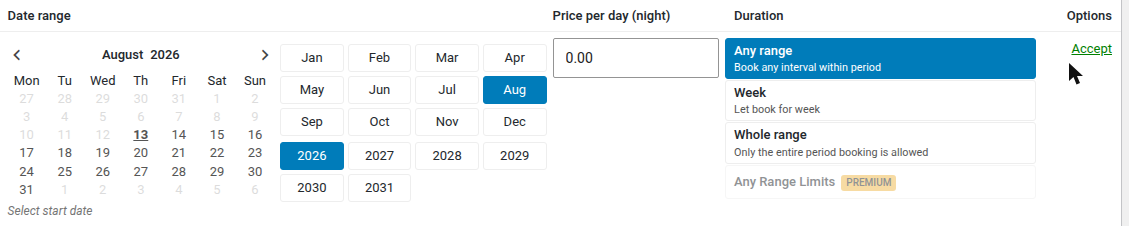
The drawer has three columns:
- Date range — a calendar. Click the start date, then the end date; the hint below reads Select start date until both are picked. Jump to month and Year next to it move the calendar without paging through the arrows.
- Price and Number of seats — the rate for one day of the period, and how many bookings the period sells per day. Leave the seats field empty for the usual one booking a day, priced per stay; chapter 9 describes what filling it in changes.
- Booking rule — the four period rules described in chapter 10.
Save period closes the drawer and rewrites the row's summary line; Cancel closes it without touching the line.
Neither button writes to the database. The row reaches it only when you press Update on the product itself — Save period and the delete button are both local to the browser until then, so the stored price list stays untouched.