The period rule decides which ranges a customer may pick inside that period. All four entries live in the Booking rule column of the row's drawer:

| Rule | Behaviour in the calendar |
|---|---|
| Any range — Book any interval within period | The customer picks any interval that fits inside the period. The default and the most common one. |
| Week — Let book for week | The customer books whole weeks starting on a chosen weekday. |
| Whole range — Only the entire period booking is allowed | Only the entire period can be booked, with no trimming. |
Any Range Limits PREMIUM | Greyed out — a paid add-on feature. |
Choosing Week reveals an extra Start of period select below the rules, holding the weekday that weeks are counted from — both when adding a period and when editing one that is already saved:
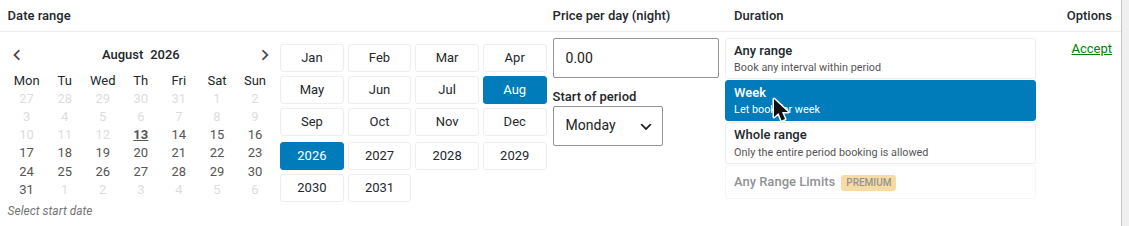
Two things worth knowing about the Week rule:
- The calendar never offers a week that would begin in the past. If the price period has already started, the first available date is the next configured weekday counting from today.
- Clicking a day that is not a week start undoes the selection — the calendar points at the correct day in a message.
Whole range behaves differently once a period has begun: since the entire period is what gets booked, a period already under way stops being available.